v1.1.11 - 2026/06/03
- Clock Layout: Automatically align weekday and date text based on the clock's position (Left/Right) for a cleaner, more balanced look.
- Community feedback: One of our anonymous survey participants suggested this alignment improvement. It was a simple change that made the clock look noticeably cleaner, so we shipped it immediately. Thanks for the suggestion — it's feedback like this that helps make MyClockTab better for everyone.
v1.1.10 - 2026/05/11
- New v2.0 Feedback Entry: Added a dedicated survey entry in the top navigation so users can quickly vote on the features they want most in v2.0.
v1.1.9 - 2026/04/22
- Dark Mode Polish: Resolved several styling inconsistencies across components to ensure colors, borders, and backgrounds look correct in dark mode.
- Timer & Stopwatch Mobile Layout: Improved layout on small screens and landscape orientation for the Timer and Stopwatch pages, making controls more reachable on mobile devices.
- SEO & Structured Data Enhancements: Improved page metadata validation, richer JSON-LD structured data, and more accurate canonical URLs across Timer, FAQ, and other pages for better search engine visibility.
- Blog Navigation Improved: Added previous and next article links at the bottom of every blog post, making it easier to read through related content without returning to the listing page.
- FAQ Sidebar Stays Put: The FAQ right-hand card now follows you as you scroll and gracefully stops before overlapping the footer, including smooth internal scrolling when the viewport is short.
v1.1.8 - 2026/04/14
- SEO-Safer Dynamic Tabs: Reworked dynamic title and favicon behavior so static metadata remains the default for non-interactive visits, while dynamic tab updates can still be restored for real users after activation.
- Favicon Support Improved: Added broader favicon support with refreshed static assets and more robust runtime head management for browser tabs.
- Timer Experience Polished: Adjusted the default timer theme and fixed mobile timer layout issues for a more reliable small-screen display.
v1.1.7 - 2026/03/31
- Background Preview Fix: Fixed an issue where system background thumbnails in Settings could fail to render consistently by switching preview rendering to native image elements for more reliable loading behavior.
- Timer Sound Preference Persistence: Improved playSound setting persistence so your sound preference is saved reliably and restored correctly across sessions.
- Initialization Save Guard: Added safeguards in Clock and Timer settings initialization to prevent redundant storage writes during startup while keeping normal user-triggered saves intact.
v1.1.6 - 2026/03/23
Pomodoro Mode Arrived: Added a built-in four-step Pomodoro flow with customizable session lengths, auto-advance, and clickable step controls so you can jump back, skip ahead, or restart the current step.
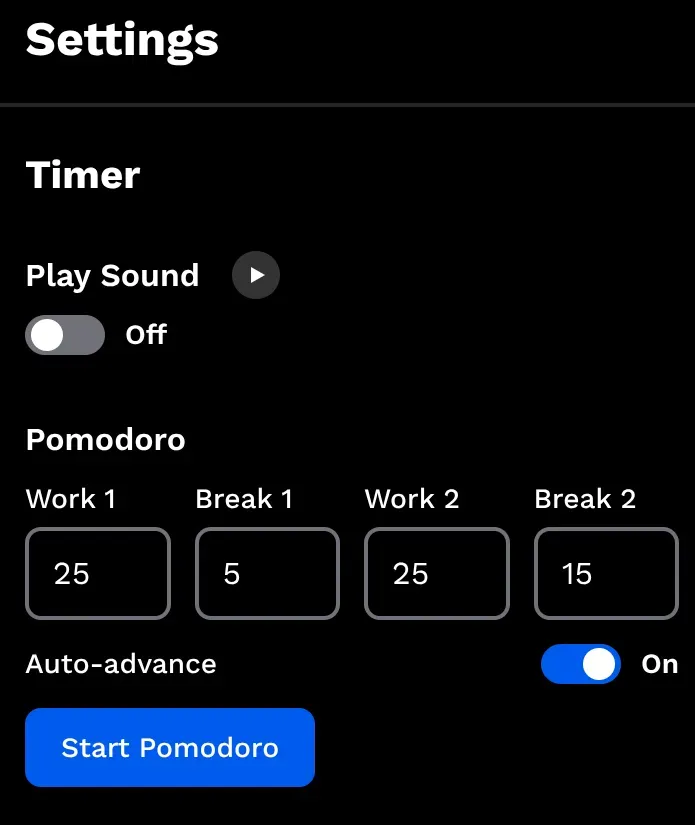
- Timer Recovery Improved: Pomodoro sessions now pause and restore cleanly after refreshes or tab closes, making it easier to resume without losing your place.
- Timer UI Refresh: Reworked timer settings and controls, including cleaner quick timers, history access, and a more polished overall interface.
- New Documentation: Published a detailed guide on MyTimerTab's new Pomodoro workflow and timer improvements.
v1.1.5 - 2026/03/03
Expanded Theme Library: Added several new built-in themes to help you find your perfect workspace "vibe."
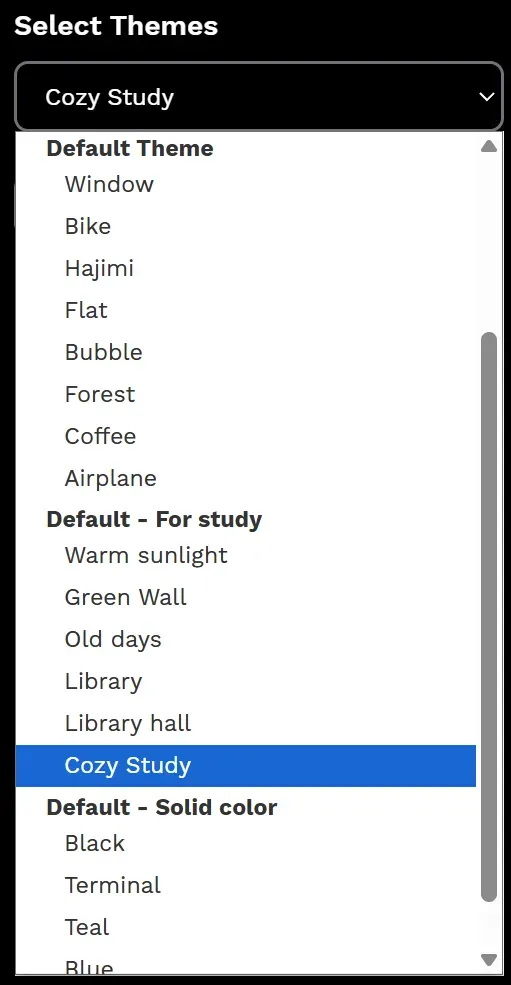
- New Documentation: Published a comprehensive guide on how to set up and customize themes.
v1.1.4 - 2026/02/09
- Fixed potential memory leak issue that could affect long-term usage stability.
- Fixed favicon link error to ensure proper display of favicons across all tabs.
- Added cache configuration to improve performance and offline capabilities.
v1.1.3 - 2026/01/19
- Dynamic favicon states now reflect the active page, with timer/stopwatch status colors and a blinking timer-end alert.
v1.1.2 - 2025/12/29
- Redesigned blog interface for improved visual hierarchy and reading comfort.
- Launched a tagging system to organize posts and enable topic-based filtering.
- Added one-click share buttons to all blog posts for easy content sharing.
- Fixed a bug that caused custom background settings to persist incorrectly when switching modes.
v1.1.1 - 2025/12/23
- Launched the Nuxt Content-powered blog with refreshed layouts and listing pages.
- Updated the launch-party post content and polish across blog and FAQ styling.
- Added Nuxt Image for optimized assets and tuned Product Hunt link/badge visuals.
- Auto-generated sitemap now includes blog routes for better SEO coverage.
v1.1.0 - 2025/12/08
- Set a new global default font for a consistent look across the app.
- Unified UI styling and spacing tweaks in Settings for a cleaner layout.
- Added a donation link to the footer to support ongoing development.
v1.0.1 - 2025/11/28
- Improved SEO: meta tuning, long-term caching headers, and structured content polish.
- Accessibility and UX refinements plus UI touch-ups.
- Performance boosts: faster font loading, smaller preview images, and smarter thumbnail loading.
- Fixed background image handling and display consistency.
v1.0.0 - 2025/11/20